If people keep calling you for directions, sending wrong screenshots, or reaching the wrong entrance, you already know why this matters. This guide is exactly about How to Create a Location QR Code in QR Dada, so your customers or guests can scan once and reach the right place without confusion.
Why Do You Need A Location QR Code?
A location QR code is one of the simplest ways to share directions without typing an address. You can place it on invites, posters, standees, shop boards, packaging, or even a WhatsApp message.
Here’s what it helps with:
- Fewer “where are you?” calls
- Faster walk-ins for stores and offices
- Easier arrivals for weddings, meetups, and conferences
- Better experience for delivery and pickup points
If you run events or a physical location, learning How to Create a Location QR Code is honestly a small change that saves a lot of time.
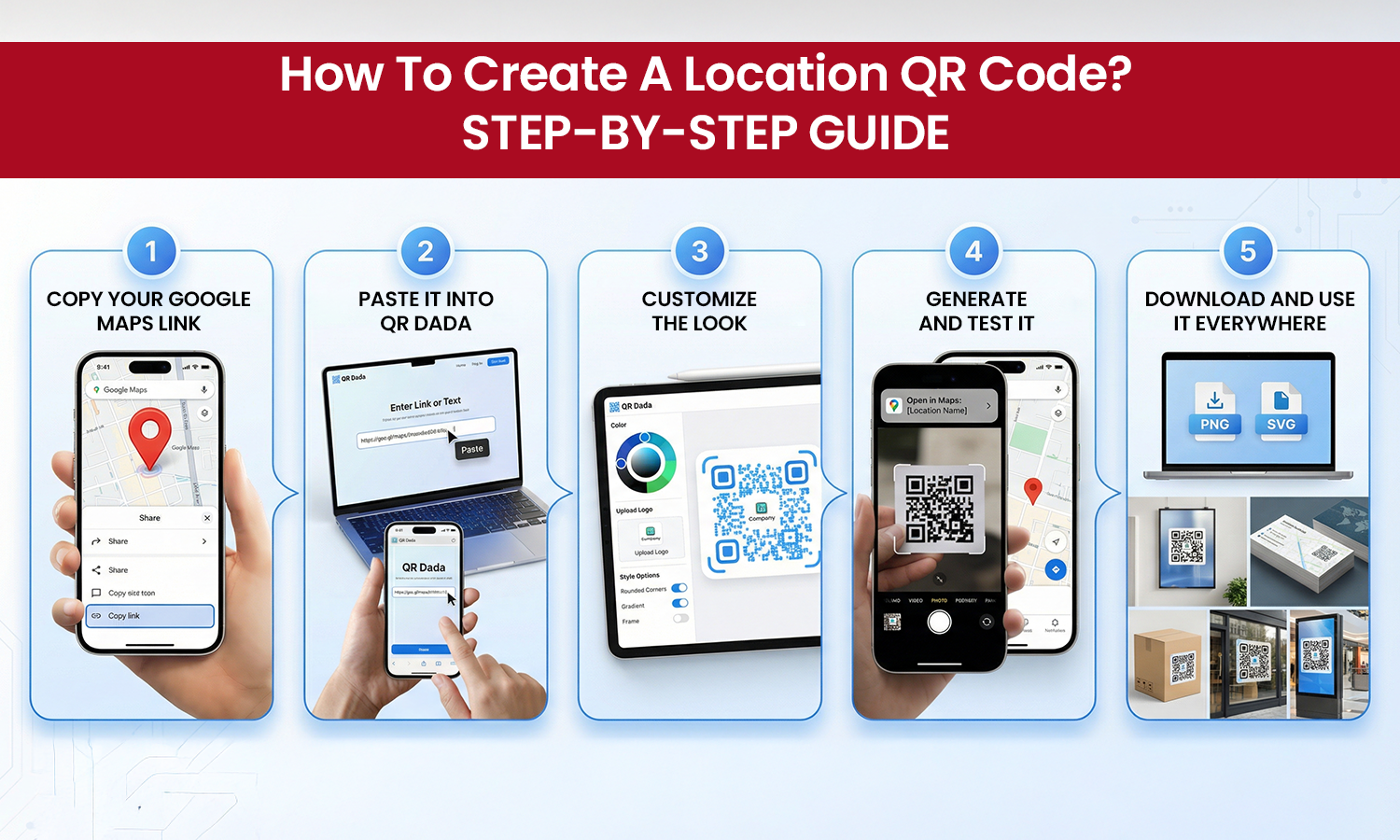
How To Create A Location QR Code? Step-By-Step Guide
If you’re wondering How to make a QR code for location, don’t overthink it. Just follow this clean process.
Step 1: Copy your Google Maps link
Open Google Maps, search your place, and copy the share link. Make sure the pin is correct before you copy it.
Step 2: Paste it into QR Dada
Go to QR Dada and choose the location QR code generator option. Paste the Google Maps link you copied, then continue.
Step 3: Customize the look
If you’re creating a QR for a business, add your brand colors and logo. A QR that matches your brand looks more trustworthy on print.
Step 4: Generate and test it
Click generate. Before you print, test it on at least two phones. This step matters more than people think, and it’s part of doing How to Create a Location QR Code properly.
Step 5: Download and use it everywhere
Download in the format you need and place it where people will actually notice it. For posters and boards, keep the QR size big enough to scan comfortably.
This is the simplest way to use a QR code generator for location without making the process technical.
Why is QR Dada The Best Location For A QR code Generator?
Most tools will give you a basic QR and stop there. QR Dada is built for businesses that want their codes to look good, scan well, and stay easy to manage.
If you are comparing options and want the Best location QR code generator, here is what makes QR Dada a better pick:
- You can design your QR code properly, not just generate a plain one
- You can create different QR types in the same dashboard, not only maps
- You can manage your QR codes cleanly when you have multiple branches or venues
- You get an experience that is built for real usage, not just one-time creation
Also, if you’re pricing-sensitive, QR Dada is a practical option as an Affordable location QR code generator, because you can start simple and scale only when you need more features.
Once you learn How to Create a Location QR Code with QR Dada, you’ll end up using it for more than just maps, because the same workflow works for URL, WhatsApp, call, event, and more.