If you want people to message you without typing your number or the keyword, this is the easiest way to do it. Generating a Text Message QR Code helps you set a phone number and a ready message so the user can scan, review, and send in seconds.
This works really well for contests, voting, feedback, opt-ins, and even quick support.
What Is a Text Message QR Code? How Does It Work?
A text message QR code opens the user’s SMS app with your phone number and a pre-filled message already in place. When the user scans, they don’t have to type anything; they just tap send.
That is why many brands use an sms qr code for campaigns where speed matters. It reduces drop-offs because the action feels easy.
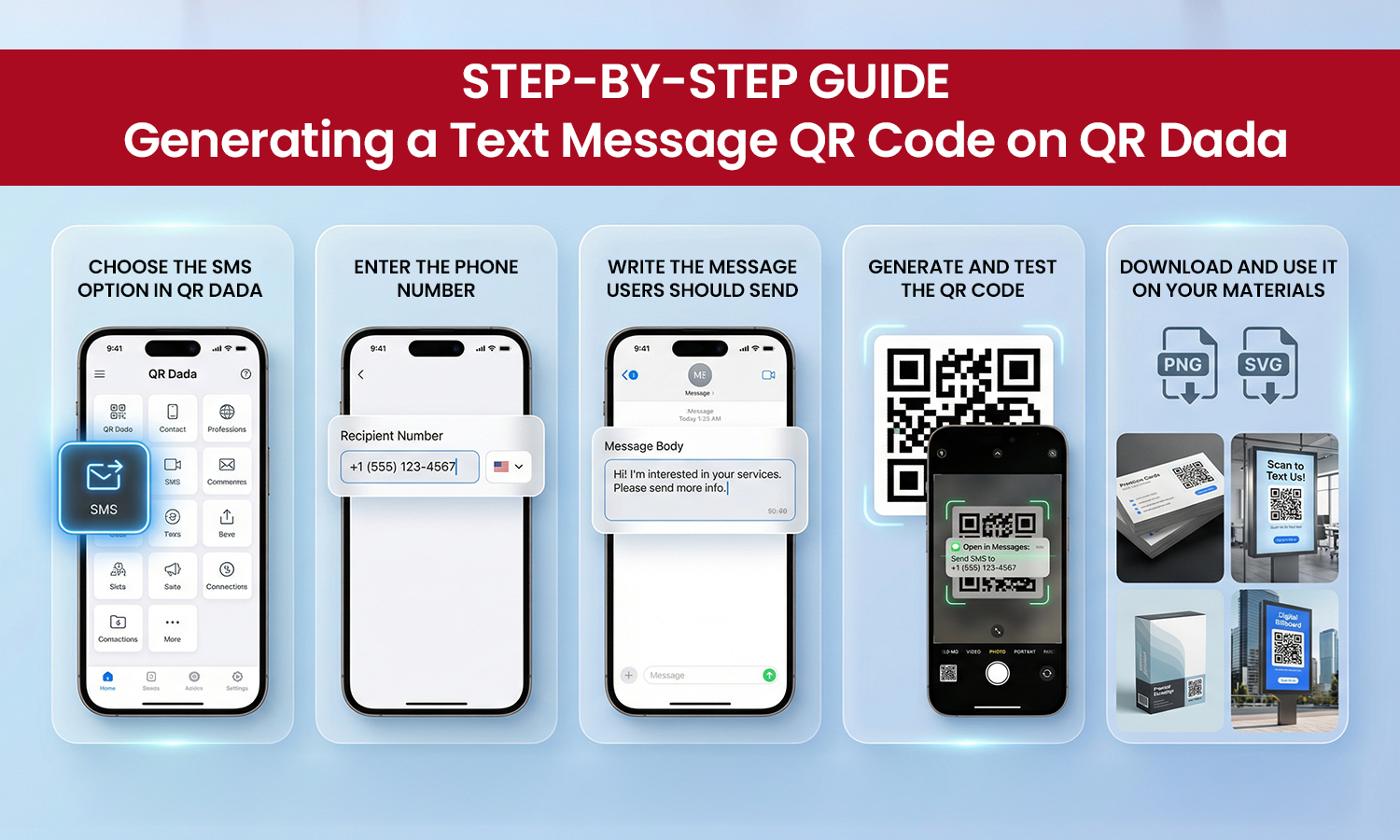
Step-by-Step Guide: Generating a Text Message QR Code on QR Dada
Here’s the clean process for generating a Text Message QR Code using QR Dada.
Step 1: Choose the SMS option in QR Dada
Log in, go to Create QR, and select SMS. This is where you start setting up your message QR.
Step 2: Enter the phone number
Add your number with the correct country code. If you’re running a national campaign, keep the format standard so users don’t face errors.
Step 3: Write the message users should send
Keep it short and direct. This could be:
- “JOIN”
- “VOTE A”
- “HELP”
- “DEMO”
This step is basically where you create QR code text message content that matches your campaign goal.
Step 4: Generate and test the QR code
Click generate. Then scan it on two devices to make sure the message opens correctly as a qr code for text message flow, and the number is accurate.
Step 5: Download and use it on your materials
Download your QR and place it on posters, labels, packaging, flyers, or even digital creatives. That’s it. You’re done with generating a Text Message QR Code and it’s ready to use.
Customizing Your Text Message QR Code
Design matters because people scan what looks trustworthy. With QR Dada you can customize colors, add a logo, and keep the QR looking clean.
A few simple tips:
- Use high contrast so scanners can read it quickly
- Don’t overcrowd the QR with too many design elements
- Add a short instruction near it like “Scan to message us.”
- Keep enough white space around the QR
If your pre-filled qr code SMS message is meant for opt-ins or support, clarity beats fancy styling every time.
Why QR Dada Is the Best Tool for Creating SMS QR Codes
There are many tools online, but for SMS QR codes, you need two things: correct formatting and clean output for print and digital.
QR Dada helps you do that with a smooth builder that works as a QR code generator for text message use-cases, plus the styling options businesses want.
It also keeps everything in one place. So if you’re running multiple campaigns, it’s easier to manage them without confusion.
And if your campaign needs a short label-style QR, you can keep the look minimal and still make the QR text message action very clear for users.